This is default featured slide 4 title

Go to Blogger edit html and find these sentences.Now replace these sentences with your own descriptions.

This is default featured slide 1 title

Go to Blogger edit html and find these sentences.Now replace these sentences with your own descriptions.

This is default featured slide 2 title

Go to Blogger edit html and find these sentences.Now replace these sentences with your own descriptions.

This is default featured slide 4 title

Go to Blogger edit html and find these sentences.Now replace these sentences with your own descriptions.

Me And My Respected Teacher Mr Kamal Sheel Mishra

Mr. K.S. Mishra is HOD of Computer Science from SMS Varanasi where I have completed my MCA

Me And My Respected Teacher Mr Udayan Maiti

Mr. Udayan Maiti is a senior .Net Expert and has guided many professionals of multi national Companies(MNC)

Me And My Best Friend Mr Ravinder Goel

Mr. Ravinder Goel is a senior Software Engineer and now he is working Wipro Technology

Sunday, 5 May 2013

How to use autocompleteextender Ajax Control example with textbox in asp.net


How to use autocompleteextender  Ajax Control example with textbox in asp.net

// For  Sql Server 2008 ……………………………..

create database test
use test
create table StateName(SrNo int identity(1,1),StateCode nvarchar(50) primary key,StateName nvarchar(50) unique)
insert into StateName values('Mahar11','Maharashtra')
insert into StateName values('Madhy11','Madhya Pradesh')
insert into StateName values('Manip11','Manipur')
insert into StateName values('Megha11','Meghalaya')
select * from StateName


// Create  connectionstring in  web.config  file……………………………

<connectionStrings>
<add name="kush" connectionString="Data Source=KUSH-PC\KUSH;Initial Catalog=test;Integrated Security=True"/>
</connectionStrings>


// How  to  apply   AutoCompleteExtender  on textbox.........................


<%@ Register assembly="AjaxControlToolkit" namespace="AjaxControlToolkit" tagprefix="asp" %>

<!DOCTYPE html PUBLIC "-//W3C//DTD XHTML 1.0 Transitional//EN" "http://www.w3.org/TR/xhtml1/DTD/xhtml1-transitional.dtd">

<html xmlns="http://www.w3.org/1999/xhtml">
<head runat="server">
 <title></title>
</head>
<body>
 <form id="form1" runat="server">
<div>
<table width="500px" border="5px">
<tr><td colspan="2">
<asp:ToolkitScriptManager ID="ToolkitScriptManager1" runat="server">
        </asp:ToolkitScriptManager></td>
 </tr>
    <tr><td>
        <asp:Label ID="Label1" runat="server" Text="StateName"></asp:Label>
        </td><td>
        <asp:TextBox ID="txtstatename" runat="server"></asp:TextBox>
    
 // after add AutoCompleteExtender write  this code …………………..
      
        <asp:AutoCompleteExtender ID="txtstatename_AutoCompleteExtender" runat="server" MinimumPrefixLength="1" EnableCaching="true" CompletionSetCount="1" CompletionInterval="1000" ServiceMethod="GetStateNames" TargetControlID="txtstatename">
        </asp:AutoCompleteExtender>
    
  </td></tr>
  </table>
   </div>
 </form>
</body>
</html>


using System;
using System.Collections.Generic;
using System.Linq;
using System.Web;
using System.Web.UI;
using System.Web.UI.WebControls;
using System.Data.SqlClient;
using System.Configuration;
using System.Data;

public partial class AutoExtenderExample : System.Web.UI.Page
{
    protected void Page_Load(object sender, EventArgs e)
    {

    }

[System.Web.Script.Services.ScriptMethod()]
[System.Web.Services.WebMethod]

public static List<string> GetStateNames(string prefixText)
{
    SqlConnection con = new SqlConnection(ConfigurationManager.ConnectionStrings["kush"].ToString());
con.Open();
SqlCommand cmd = new SqlCommand("select * from StateName where StateName like @State+'%'", con);
cmd.Parameters.AddWithValue("@State", prefixText);
SqlDataAdapter da = new SqlDataAdapter(cmd);
DataTable dt = new DataTable();
da.Fill(dt);
List<string> StateNames = new List<string>();
for (int i = 0; i < dt.Rows.Count; i++)
{
 StateNames.Add(dt.Rows[i][2].ToString());
}
return StateNames;
}
}


Friday, 3 May 2013

How to Upload data of DataGridView in Microsoft Excel


How to Upload data of DataGridView in Microsoft Excel

create database test
use test
create table StudentDetails(Name nvarchar(50),FatherName nvarchar(50), MobileNo nvarchar(50))
insert into StudentDetails values('Anurag Sir','Mr Mudgal','08802200402')
insert into StudentDetails values('Kush Tiwari','Jai Prakash Tiwari','9451119029')

First we take a Windows Form after it we add add reference Microsoft  Excel 12.0 object Library 1.6    in our  application then take  a DataGridView and bind it with table   and when you click the button  you will see the all data inside DataGridView   in Microsoft Excel format
You  can also save  it if youwant to


using System;
using System.Collections.Generic;
using System.ComponentModel;
using System.Data;
using System.Drawing;
using System.Linq;
using System.Text;
using System.Windows.Forms;
using System.Data.SqlClient;

namespace GridViewWithExcelSheet
{
    public partial class DataGridwithExcelSheet : Form
    {
        public DataGridwithExcelSheet()
        {
            InitializeComponent();
        }

  private void DataGridwithExcelSheet_Load(object sender, EventArgs e)
 {
   //create code to connectivity with table show  data  in gridview on Page Load

 SqlConnection con = new SqlConnection(@"Data Source=KUSH-PC\KUSH;Initial Catalog=test;Integrated Security=True");
 SqlCommand cmd = new SqlCommand("select * from StudentDetails", con);
 SqlDataAdapter da = new SqlDataAdapter(cmd);
 DataSet ds = new DataSet();
 da.Fill(ds, "StudentDetails");

 dataGridView1.DataSource = ds.Tables["StudentDetails"];
 }

private void btnUpload_Click(object sender, EventArgs e)
{
 try
{
  Microsoft.Office.Interop.Excel.Application ExcelApp = new Microsoft.Office.Interop.Excel.Application();
  Microsoft.Office.Interop.Excel._Workbook ExcelBook;
  Microsoft.Office.Interop.Excel._Worksheet ExcelSheet;

  int i = 0;
  int j = 0;

 //create object of excel
 ExcelBook = (Microsoft.Office.Interop.Excel._Workbook)ExcelApp.Workbooks.Add(1);
 ExcelSheet = (Microsoft.Office.Interop.Excel._Worksheet)ExcelBook.ActiveSheet;
 //export header
 for (i = 1; i <= this.dataGridView1.Columns.Count; i++)
{
 ExcelSheet.Cells[1, i] = this.dataGridView1.Columns[i - 1].HeaderText;
 }

 //export data
 for (i = 1; i <= this.dataGridView1.RowCount; i++)
 {
  for (j = 1; j <= dataGridView1.Columns.Count; j++)
  {
 ExcelSheet.Cells[i + 1, j] = dataGridView1.Rows[i - 1].Cells[j - 1].Value;
   }
 }

ExcelApp.Visible = true;

//set font Khmer OS System to data range
 Microsoft.Office.Interop.Excel.Range myRange = ExcelSheet.get_Range(ExcelSheet.Cells[1, 1], ExcelSheet.Cells[this.dataGridView1.RowCount + 1, this.dataGridView1.Columns.Count]);
Microsoft.Office.Interop.Excel.Font x = myRange.Font;
x.Name = "Arial";
x.Size = 10;

//set bold font to column header
 myRange = ExcelSheet.get_Range(ExcelSheet.Cells[1, 1], ExcelSheet.Cells[1,this.dataGridView1.Columns.Count]);
                
x = myRange.Font;
 x.Bold = true;
               
//autofit all columns
 myRange.EntireColumn.AutoFit();
 //
 ExcelSheet = null;
ExcelBook = null;
ExcelApp = null;
  }
 catch (Exception ex)
 {
  LMessage.Text = ex.Message;
  }
}
}

Monday, 15 April 2013

How to use ExecuteScalar in Ado.Net with C#


How to use ExecuteScalar  in Ado.Net  with  C#

create database test
use test
create table McaStudent(RollNo int identity(1,1),StudentId as 'Mca' + cast(RollNo asvarchar(10)),Name nvarchar(50),Gender nvarchar(50),Course nvarchar(50),Addressnvarchar(max))


insert into McaStudent values('Somesh', 'Male','B. Tech.','Kanpur')

*************************

using System;
using System.Collections.Generic;
using System.Linq;
using System.Web;
using System.Web.UI;
using System.Web.UI.WebControls;
using System.Data.SqlClient;

public partial class Registration : System.Web.UI.Page
{
    protected void Page_Load(object sender, EventArgs e)
    {
         con = new SqlConnection("Data Source=kush;Initial Catalog=test;Integrated Security=True");
    }      
    SqlConnection con;
    protected void BtnSave_Click(object sender, EventArgs e)
    {
        con.Open();

       // SqlCommand cmd = new SqlCommand("insert into McaStudent (Name,Gender,Course,Address) output inserted.StudentId values ('" + txtName.Text + "','" + RbGender.SelectedValue + "','" + ddlCourse.SelectedItem.Text + "','" + txtAddress.Text + "')", con);
        SqlCommand cmd = new SqlCommand("insert into McaStudent  output inserted.StudentId values ('" + txtName.Text + "','" + RbGender.SelectedValue + "','" + ddlCourse.SelectedItem.Text + "','" + txtAddress.Text + "')", con);
       LStudentId.Text= ""+cmd.ExecuteScalar();
       con.Close();
       LMessage.Text = "Add Success fully";
 }


    protected void BtnNoRow_Click(object sender, EventArgs e)
    {
       int count=0;
      String sqlQuery = "Select COUNT(*) from McaStudent";
        SqlCommand cmd = new SqlCommand(sqlQuery, con);
        try
        {
            con.Open();
            //Since count  is intger,System.Object, a typecast is must
            count = (Int32)cmd.ExecuteScalar();
            LMessage.Text = count.ToString();

        }
        catch (Exception ex)
        {
            LMessage.Text = ex.Message;
        }
        finally
        {
            con.Close();
        }
     
    }
}


Saturday, 6 April 2013

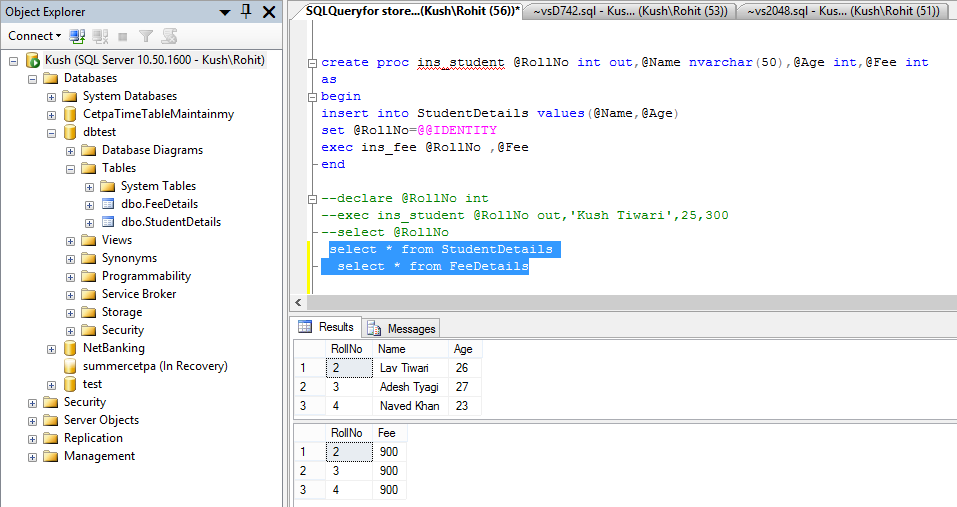
How to execute stored procedure in another store procedure


How to execute stored procedure in another store procedure

--Create Database
create database dbtest

--Use Database
use dbtest

--Create table StudentDetails RollNo with primary key

create table StudentDetails(RollNo int identity(1,1) primary key,Name nvarchar(50),Age int)

--Create table FeeDetails RollNo relation with StudentDetails RollNo(foregin key)

create table FeeDetails(RollNo int foreign key references StudentDetails(RollNo),Fee int)

--Create proc ins_fee on FeeDetails Table

create proc  ins_fee @RollNo int,@Fee int
as
begin
insert into FeeDetails values(@RollNo,@Fee)
end

--exec ins_fee 1,500

--Create proc ins_student on StudentDetails Table using out keyword

create proc ins_student @RollNo int out,@Name nvarchar(50),@Age int,@Fee int
as
begin
insert into StudentDetails values(@Name,@Age)
set @RollNo=@@IDENTITY
exec ins_fee @RollNo ,@Fee
end

--declare @RollNo int
--exec ins_student @RollNo out,'Kush Tiwari',25,300
--select @RollNo

 select * from StudentDetails
  select * from FeeDetails


################################################################


using System.Web.UI;
using System.Web.UI.WebControls;
using System.Data.SqlClient;
using System.Data;


public partial class MyPage : System.Web.UI.Page
{     


    protected void Page_Load(object sender, EventArgs e)
    {

    }
    protected void BtnSave_Click(object sender, EventArgs e)
    {
SqlConnection con = new SqlConnection("Data Source=kush;Initial Catalog=dbtest;Integrated Security=True");
        con.Open();
        SqlCommand com = new SqlCommand("ins_student", con);
        com.CommandType = CommandType.StoredProcedure;
        com.Parameters.AddWithValue("@Name", txtname.Text);
        com.Parameters.AddWithValue("@Age", Convert.ToInt32(txtage.Text));
        com.Parameters.AddWithValue("@Fee", Convert.ToInt32(txtfee.Text));
        com.Parameters.Add("@RollNo", SqlDbType.Int);
        com.Parameters["@RollNo"].Direction = ParameterDirection.Output;
        com.ExecuteNonQuery();
        con.Close();

        LMessage.Text = "Your rollno is:" +"    "+ com.Parameters["@RollNo"].Value.ToString();


    }
}